AI Business Process Automation: How to Automate Smarter in 2026
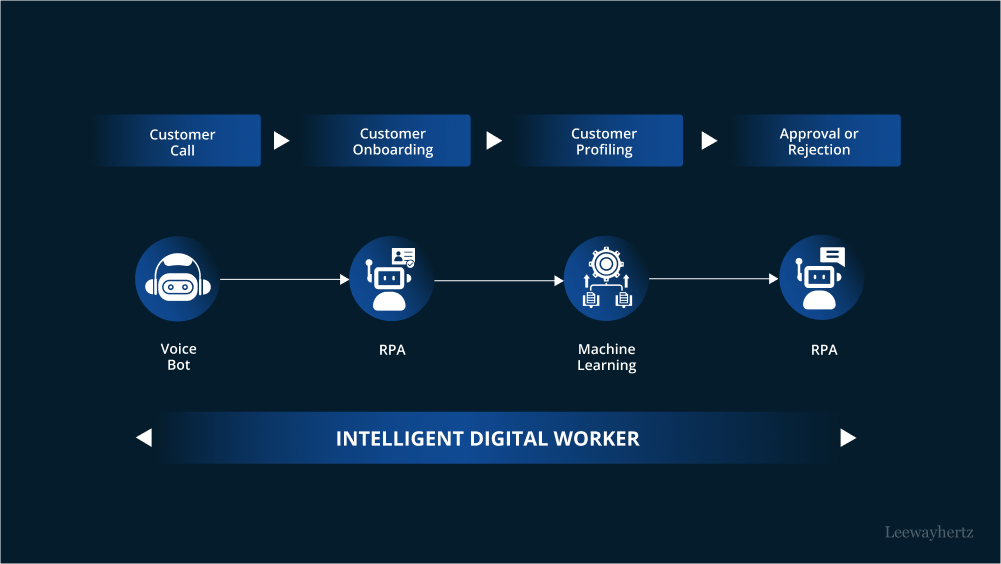
Businesses are increasingly turning to artificial intelligence to improve productivity, reduce repetitive work, and make faster decisions. However, simply adding AI to an inefficient workflow does not automatically create better results. In many cases, businesses need to review and improve their existing processes before automating them. AI Business Process Automation combines artificial intelligence with automation technologies to handle repetitive tasks, analyze information, support decision-making, and improve business workflows.
In 2026, this approach is becoming an important part of digital transformation for organizations of different sizes.
The key is not to automate everything. Instead, businesses should identify the right processes, remove unnecessary steps, and then use AI to automate tasks where it can deliver measurable value.
What Is AI Business Process Automation?
The term “AI Business Process Automation” describes the application of automation technologies and artificial intelligence to carry out or assist with business tasks that have historically required manual labour.
Traditional automation generally follows predefined rules. AI-powered automation can go further by processing unstructured information, recognizing patterns, generating content, understanding natural language, and adapting to different situations.
For example, a business could use AI to:
- Process customer inquiries
- Classify incoming emails
- Extract information from documents
- Automate invoice processing
- Analyze sales data
- Generate reports
- Support customer service teams
- Qualify potential leads
- Summarize meetings and documents
- Assist employees with routine administrative work
When these capabilities are integrated into existing workflows, businesses can reduce manual effort while allowing employees to focus on higher-value activities.

Why Businesses Are Adopting AI Automation in 2026
The growing amount of business data and increasing demand for faster operations are encouraging organizations to explore AI-powered workflows.
Several factors are driving adoption.
1. Reducing Repetitive Work
Employees often spend significant amounts of time completing repetitive administrative tasks. AI automation can handle many routine activities, allowing employees to spend more time on customer relationships, strategy, creativity, and problem-solving.
2. Improving Operational Efficiency
Well-designed automation can reduce unnecessary manual steps and make processes more consistent. A streamlined workflow can also help teams complete tasks more quickly.
3. Supporting Faster Decisions
Large volumes of data can be analysed by AI systems to find patterns that might be challenging to find by hand. Businesses can use these insights to support forecasting, reporting, customer analysis, and operational decisions.
4. Improving Customer Experiences
AI-powered chatbots, virtual assistants, recommendation systems, and automated support workflows can help businesses respond to customers more quickly.
5. Scaling Business Operations
Automation can help organizations manage increasing workloads without increasing manual effort at the same rate. This can be particularly useful for growing companies.
Why You Should Fix a Process Before Automating It
One of the biggest mistakes businesses can make is automating a poorly designed process.
If a workflow contains unnecessary approvals, duplicate data entry, unclear responsibilities, or outdated steps, automation may simply make those problems happen faster.
A useful principle is:
Optimize first. Automate second.
Before introducing AI, businesses should examine how a process currently works.
Ask questions such as:
- What is the purpose of this process?
- Which steps create real value?
- Which steps are unnecessary?
- Where do delays occur?
- Where are employees entering the same information repeatedly?
- Which tasks generate the most errors?
- Which decisions require human judgment?
- What information does the process depend on?
Once these questions are answered, businesses can redesign the workflow before introducing automation.
How to Automate Business Processes Smarter
Step 1: Identify Repetitive Processes
Start by identifying tasks that happen frequently and follow relatively predictable patterns.
Examples include data entry, document classification, appointment scheduling, invoice processing, report generation, and basic customer inquiries.
Not every process needs AI. Businesses should focus on areas where automation can create measurable benefits.
Step 2: Map the Existing Workflow
Create a clear picture of how the process currently works.
Document:
- The starting point
- Inputs and data sources
- Individual tasks
- Approvals
- Decisions
- Employees or departments involved
- Final outputs
This helps reveal bottlenecks and unnecessary steps.
Step 3: Remove Unnecessary Steps
Before automating, eliminate duplicated work and outdated procedures.
For example, if two departments manually enter the same customer information into separate systems, the better solution may be to improve data integration rather than automate both manual entry processes.
Step 4: Decide Where AI Adds Value
After optimizing the workflow, determine where AI can provide additional value.
AI is particularly useful for tasks involving:
- Natural language
- Document understanding
- Pattern recognition
- Prediction
- Classification
- Content generation
- Data analysis
- Intelligent recommendations
Rule-based automation may still be more appropriate for simple, predictable tasks.
Step 5: Keep Humans in the Loop
Not every business decision should be completely automated.
Human oversight remains important when processes involve sensitive information, significant financial consequences, complex customer situations, or decisions requiring professional judgment.
A human-in-the-loop model can allow AI to perform routine work while employees review important decisions.
Step 6: Test Before Scaling
Businesses should begin with a limited automation project rather than immediately transforming an entire department.
A pilot can help teams evaluate:
- Accuracy
- Processing time
- Cost savings
- Employee adoption
- Customer impact
- Error rates
- Security concerns
The results can then guide a larger implementation.
Common AI Business Process Automation Mistakes
Automating Broken Workflows
Automation cannot automatically solve a poorly designed process. Businesses should redesign inefficient workflows first.
Automating Everything
Not every task benefits from automation. Some processes are too complex, unpredictable, or dependent on human interaction.
Ignoring Data Quality
The quality of the inputs used by AI systems is crucial. Inaccurate, incomplete, or inconsistent data can produce unreliable results.
Removing Human Oversight
Completely removing people from important workflows can create operational and compliance risks. Human review should remain where appropriate.
Focusing Only on Technology
Successful automation is not just a technology project. Employees need training, clear responsibilities, and an understanding of how the new workflow will operate.
Measuring the Wrong Things
Simply counting the number of automated tasks does not prove that automation is successful.
Businesses should measure outcomes such as processing time, error rates, operating costs, customer satisfaction, and employee productivity.
Benefits of AI Business Process Automation
When implemented strategically, AI automation can provide several potential benefits.
Lower Manual Workloads
AI can handle repetitive activities, reducing the amount of routine work employees need to complete manually.
Faster Processing
Automated workflows can operate continuously and process information more quickly than many manual processes.
Greater Consistency
Automated systems can follow standardized workflows, potentially reducing variations caused by manual procedures.
Better Use of Employee Time
Employees can dedicate more time to activities that require communication, creativity, strategic thinking, and judgment.
Improved Business Insights
AI can analyze operational data and help organizations identify trends, inefficiencies, and opportunities.
AI Automation and Different Business Departments
AI Business Process Automation can be applied across many departments.
Marketing
Marketing teams can automate customer segmentation, content workflows, campaign analysis, and lead management.
Sales
Sales teams can use AI to qualify leads, summarize customer interactions, analyze opportunities, and support sales forecasting.
Customer Service
AI assistants can answer common questions, classify support requests, and route complex cases to human representatives.
Finance
Finance departments can automate invoice processing, document extraction, expense management, and financial reporting workflows.
Human Resources
HR teams can use automation for employee onboarding, document management, candidate communication, and routine administrative activities.
IT
IT teams can automate ticket classification, system monitoring, incident workflows, and routine support tasks.
How to Measure AI Automation Success
Businesses should establish measurable objectives before launching an automation project.
Important metrics can include:
- Time saved per process
- Processing costs
- Error rates
- Employee productivity
- Customer response times
- Customer satisfaction
- Automation accuracy
- Number of manual steps removed
- Return on investment
For example, if an automated workflow reduces processing time but creates more errors, the business may need to redesign the implementation rather than simply expanding it.
The Future of AI Business Process Automation
AI automation is expected to become increasingly integrated with everyday business software and workflows.
Rather than operating as isolated tools, AI systems can increasingly become part of broader business processes. Employees may interact with AI assistants directly within the applications they already use, while automated systems coordinate information and tasks across departments.
However, successful automation will continue to depend on strong processes, reliable data, appropriate governance, and human oversight.
The businesses that approach AI strategically are more likely to focus on how work should be performed, rather than simply asking which tasks can be automated.
Final Thoughts
AI Business Process Automation can help organizations improve efficiency, reduce repetitive work, and create more scalable operations. However, automation should not be treated as a shortcut for fixing inefficient processes.
The smarter approach in 2026 is to examine existing workflows, remove unnecessary steps, improve data quality, identify where AI can provide genuine value, and maintain human oversight where necessary.
Ultimately, successful AI automation is not about automating the largest possible number of tasks. It is about creating better business processes with the right combination of AI, automation, data, and human expertise.




Post Comment