Is Read AI a Microsoft Product? Everything You Need to Know
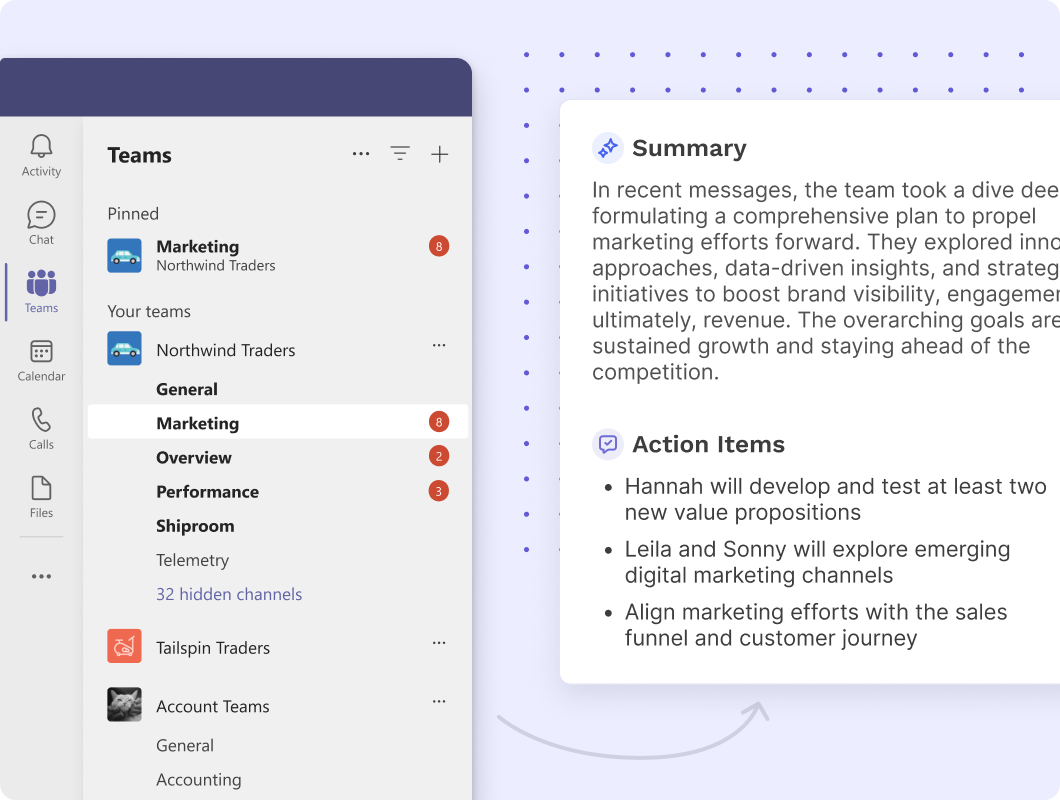
If you’ve seen Read AI integrated with Microsoft Teams or Outlook, you might wonder whether it’s a Microsoft product. The short answer is no. Read AI is an independent artificial intelligence company that builds productivity tools for meetings, emails, and collaboration. While it works closely with Microsoft’s ecosystem, it is not owned, developed, or operated by Microsoft. Read AI a Microsoft product, helps teams streamline meetings, capture insights, and improve productivity.
This guide explains what Read AI is, how it relates to Microsoft, and whether it’s safe to use.
What Is Read AI?
Read AI is an AI-powered productivity platform designed to improve meetings and workplace communication. It automatically generates meeting summaries, transcripts, action items, and analytics, helping teams save time and stay organized.
Some of its key features include:
- AI meeting notes and summaries
- Automatic transcription
- Action item detection
- Speaker insights and participation metrics
- Email and calendar assistance
- Searchable meeting history
- Integration with collaboration tools
Among the popular platforms that Read AI supports are Microsoft Teams, Zoom, Google Meet, Slack, and email services.

Is Read AI a Microsoft Product?
No. Read AI is not a Microsoft product.
It is developed and maintained by Read AI, an independent company. Microsoft does not own Read AI, and it is separate from Microsoft’s own AI offerings such as Microsoft Copilot.
However, Read AI offers integrations with Microsoft products, which is why many users mistakenly assume it belongs to Microsoft.
Why Do People Think Reading AI Is a Microsoft Product?
There are several reasons for the confusion:
1. It Works with Microsoft Teams
Read AI may participate in Microsoft Teams meetings, record discussions (if allowed), produce transcripts, and produce meeting summaries driven by AI.
2. It Connects to Microsoft 365
Users can connect their Microsoft 365 accounts to synchronize calendars, emails, and meeting information, creating a more seamless workflow.
3. It’s Available Through Microsoft’s Marketplace
Read AI is available through Microsoft’s app ecosystem, similar to thousands of third-party applications that integrate with Microsoft services. Availability in the marketplace does not mean Microsoft owns the software.
Read AI vs. Microsoft Copilot
Although both use artificial intelligence to improve productivity, they are different products.
| Feature | Read AI | Microsoft Copilot |
| Company | Read AI | Microsoft |
| Ownership | Independent | Microsoft |
| Primary Focus | Meeting intelligence | AI assistant across Microsoft 365 |
| Meeting Summaries | Yes | Yes (supported Microsoft 365 plans) |
| AI Email Assistance | Yes | Yes |
| Teams Integration | Yes | Native |
| Outlook Integration | Yes | Native |
Microsoft Copilot is deeply integrated into Microsoft 365 applications such as Word, Excel, PowerPoint, Outlook, and Teams. Read AI focuses primarily on meeting intelligence and collaboration across multiple platforms.
What Can Read AI Do with Microsoft Teams?
When connected to Microsoft Teams, Read AI can:
- Join scheduled meetings automatically
- Record and transcribe conversations (subject to permissions)
- Generate AI summaries
- Identify key decisions
- Capture action items
- Highlight important moments
- Measure meeting engagement
- Share summaries after meetings
These features help reduce manual note-taking and improve follow-up after meetings.
Is Read AI Safe to Use?
Read AI includes security and privacy features intended for business use. Before implementing the platform extensively, organizations should still examine its permissions, privacy policy, and compliance paperwork.
Before connecting Read AI to a Microsoft account, consider:
- What data the application can access
- Whether your organization permits third-party AI tools
- Your company’s data retention and compliance requirements
- Required administrative approvals
Many businesses use Read AI successfully, but organizations with strict security policies should verify that it aligns with their internal requirements.
Does Microsoft Recommend Read AI?
Through its APIs and marketplace, Microsoft makes it possible for numerous third-party applications to integrate with Microsoft 365.
Being available in Microsoft’s ecosystem does not mean Microsoft officially endorses or owns every application. Users should evaluate Read AI on its own features, pricing, security, and compatibility.
Who Should Use Read AI?
Read AI may be useful for:
- Remote teams
- Sales professionals
- Project managers
- Customer success teams
- Recruiters
- Consultants
- Students attending online classes
- Anyone who wants automatic meeting notes
If your work involves frequent virtual meetings, Read AI can reduce administrative work by creating summaries and tracking action items automatically.
Frequently Asked Questions
Is Read AI owned by Microsoft?
No. Read AI is owned and operated by Read AI, an independent company.
Does Read AI work with Microsoft Teams?
Indeed. Read AI provides AI-generated meeting notes, transcripts, summaries, and action items by integrating with Microsoft Teams.
Is Read AI included with Microsoft 365?
No. Read AI is a separate service. Some features may integrate with Microsoft 365, but it requires its own account or subscription depending on the plan you choose.
Is Read AI the same as Microsoft Copilot?
No. Microsoft Copilot is Microsoft’s native AI assistant for Microsoft 365, while Read AI is an independent meeting intelligence platform.
Final Thoughts
Read AI is not a Microsoft product, but it is designed to work seamlessly with Microsoft tools like Teams, Outlook, and Microsoft 365. Its strong integrations often lead users to assume it belongs to Microsoft, but the two companies are separate.
If your primary need is AI-powered meeting summaries, transcripts, and action items across multiple platforms, Read AI is a capable option. Microsoft Copilot might be a better option if you want AI integrated right into Microsoft 365 programs like Word, Excel, PowerPoint, Outlook, and Teams. Understanding the distinction can help you choose the solution that best matches your workflow.



Post Comment