Windows 10 vs Windows 11: Which Operating System Is Better?
Introduction
Windows is one of the most popular operating systems in the world. Microsoft developed In order to give people a comfortable, safe, and effective computer experience, Microsoft created Windows 10 vs Windows 11. Both operating systems are useful for students, professionals, gamers, and businesses. However, Windows 11 introduces a modern design, improved multitasking, and stronger security requirements. Windows 10 is known for its familiar interface and compatibility with older computers. Understanding their differences helps users choose the best operating system.
Comparison Table: Windows 10 vs Windows 11
| Features | Windows 10 | Windows 11 |
| Release date | July 29, 2015 | October 5, 2021 |
| User interface | Traditional design | Modern design |
| Start Menu | Left-aligned | Centered by default |
| Taskbar | Traditional taskbar | Redesigned taskbar |
| Performance | Good on older computers | Optimized for modern hardware |
| Security | Standard security features | Enhanced hardware-based security |
| Gaming | DirectX 12 support | Auto HDR and DirectStorage support |
| Multitasking | Snap Assist | Snap Layouts and Snap Groups |
| File Explorer | Traditional interface | Includes tabs |
| Minimum RAM | 1 GB (32-bit), 2 GB (64-bit) | 4 GB |
| Storage | 32 GB for newer Windows 10 versions | 64 GB |
| TPM requirement | Not generally required | TPM 2.0 required |
| Compatibility | Supports many older devices | Requires compatible hardware |
| Support status | Standard support ended October 14, 2025 | Currently supported |
1. User Interface and Design
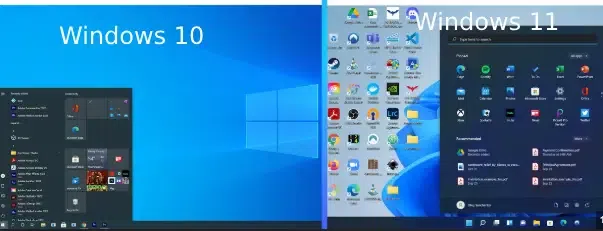
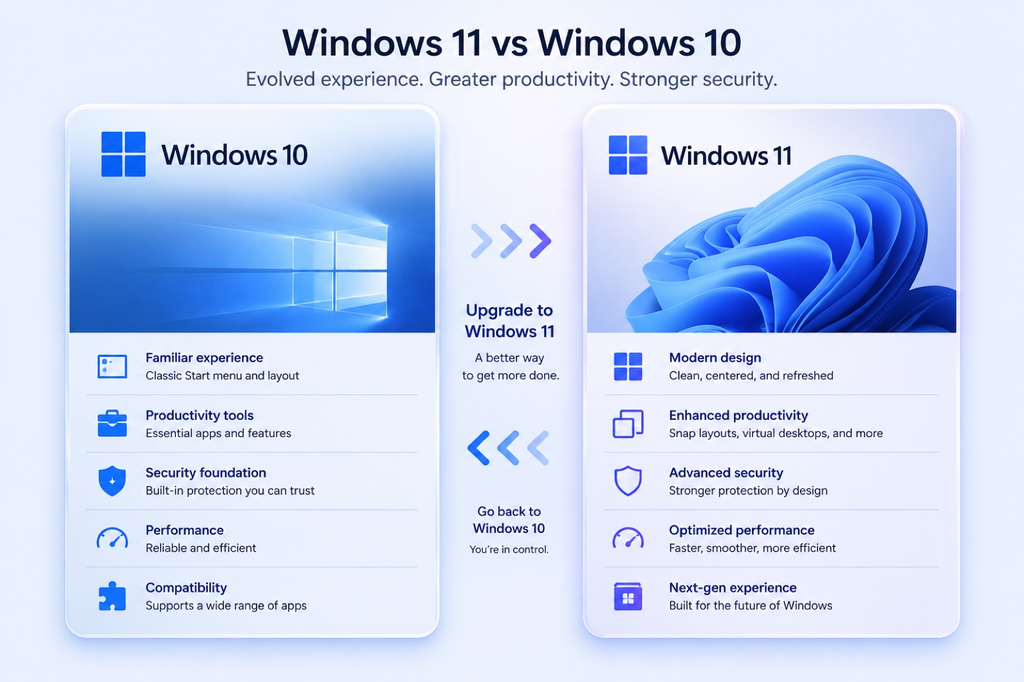
Windows 10 has a traditional desktop interface with a Start Menu on the left side of the taskbar. It includes Live Tiles, familiar menus, and customizable desktop settings. Users who have worked with previous Windows versions can easily understand its interface.
Windows 11 introduces a modern and attractive design. Its Start Menu and taskbar icons are centered by default, and windows have rounded corners. It also includes updated animations, improved settings, and a cleaner desktop appearance. Although Windows 11 looks more modern, some users prefer Windows 10’s familiar layout.
2. Performance and Speed
Performance depends on the computer’s processor, RAM, storage, and other hardware components. Windows 10 performs well on many older computers and provides a smooth experience for everyday activities such as browsing, writing documents, and watching videos.
Windows 11 delivers enhanced system management and efficiency and is built for contemporary technology. On compatible computers, it provides a responsive experience when opening applications and switching between tasks. However, upgrading does not automatically make every computer faster. Users should check their system compatibility before upgrading.
3. Security Features
Security is an important difference between Windows 10 and Windows 11. Windows 10 includes Windows Defender, firewall protection, and other security tools that help protect users from malware and online threats.
Windows 11 emphasizes hardware-based security. TPM 2.0 and Secure Boot functionality on compatible computers are prerequisites. These requirements help protect the computer during startup and improve protection against certain security threats. Additionally, Windows 11 supports contemporary security measures like Windows Hello.
Microsoft officially ended standard Windows 10 support on October 14, 2025. Therefore, users should consider security updates and support options when deciding whether to continue using Windows 10.
4. Gaming Experience
Windows 10 is a suitable operating system for gaming. It supports DirectX 12, gaming applications, and a wide range of graphics cards. Many older games also work well with Windows 10 because of its compatibility.
Windows 11 provides additional gaming features, including Auto HDR on supported displays and DirectStorage support for compatible hardware and games. These technologies can improve visual quality and loading experiences. However, actual gaming performance depends on the graphics card, processor, memory, and game optimization.
5. Multitasking and Productivity
Windows 10 allows users to run multiple applications, create virtual desktops, and arrange windows using Snap Assist. These features are useful for students and professionals who work with several programs simultaneously.
Windows 11 improves multitasking using Snap Layouts and Snap Groups. Users can organize multiple windows into different layouts and return to grouped applications more easily. Its virtual desktop features also help users separate work, study, and personal activities.
Windows 11 additionally provides File Explorer tabs, making it easier to manage several folders in one window.
6. System Requirements and Compatibility
Windows 10 supports a wider range of older computers. It can operate on hardware that does not meet Windows 11 requirements, making it useful for people who cannot afford to purchase a new computer.
A suitable 64-bit processor, at least 4 GB of RAM, 64 GB of storage, TPM 2.0, and UEFI firmware with Secure Boot functionality are all need for Windows 11. These requirements improve security and reliability but prevent some older computers from upgrading officially.
Conclusion
Windows 10 vs Windows 11 are both powerful operating systems, but they serve different needs. Windows 10 offers familiarity and compatibility with older computers, while Windows 11 provides a modern design, improved productivity features, and stronger hardware-based security. Since Windows 10 standard support ended in October 2025, upgrading to Windows 11 is the recommended option for compatible devices. Ultimately, the best operating system depends on the user’s hardware, software requirements, and personal preferences.
Frequently Asked Questions (FAQs)
1. What is the main difference between Windows 10 and Windows 11?
Windows 10 has a traditional interface, while Windows 11 offers a modern design, improved multitasking, and enhanced security features.
2. Is Windows 11 better than Windows 10?
Yes, Windows 11 is generally better for compatible computers because it provides modern features, improved security, and better productivity tools.
3. Which is faster, Windows 10 or Windows 11?
Windows 11 can perform better on modern hardware, but speed depends on the processor, RAM, storage, and computer configuration.
4. Can I upgrade Windows 10 to Windows 11 for free?
Yes, eligible Windows 10 computers can upgrade to Windows 11 for free if they meet Microsoft’s system requirements and have a valid Windows license.
5. Is Windows 10 still supported?
Standard Windows 10 support ended on October 14, 2025. Users should consider upgrading to Windows 11 or checking available extended security options.
6. Which is better for gaming, Windows 10 or Windows 11?
Windows 11 is generally recommended for modern gaming because it supports features such as Auto HDR and DirectStorage on compatible hardware. However, gaming performance depends on your computer’s specifications.

Post Comment