Google Meet API: Everything You Need to Know in 2026

Introduction
Online meetings have become a core part of modern business communication, remote work, education, and digital collaboration. As organizations look for smarter ways to manage meetings, analyze conversations, and automate workflows, Google Meet API have become essential tools for building advanced communication solutions.
The Google Meet API enables developers and businesses to integrate Google Meet capabilities into applications, workflows, and AI-powered platforms. By connecting meeting data, events, and collaboration features with custom software, organizations can create intelligent meeting experiences, improve productivity, and build AI-powered meeting infrastructure.
In 2026, the Google Meet API is becoming increasingly valuable for businesses developing solutions such as AI meeting assistants, automated transcription systems, meeting analytics platforms, and enterprise collaboration tools.
This guide explains what the Google Meet API is, its features, benefits, use cases, integration process, challenges, and future possibilities.
What Is Google Meet API?
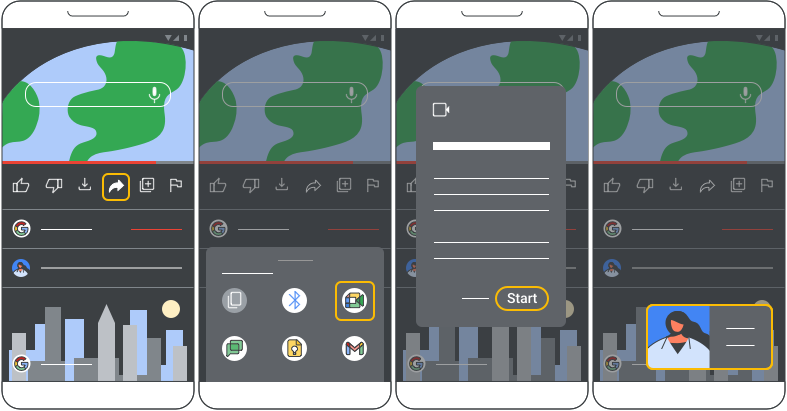
The Google Meet API is a developer tool that allows applications to interact with Google Meet services programmatically. It enables businesses and developers to create integrations that connect meeting functionality with their own applications and workflows.
Instead of manually managing meetings, organizations can use APIs to automate processes such as:
- Meeting creation
- Meeting management
- Meeting information retrieval
- Attendance tracking
- Meeting analytics
- Integration with productivity tools
- AI-powered meeting workflows
The API helps developers extend Google Meet beyond basic video conferencing.
Why Google Meet API Matters in 2026
Businesses are increasingly using AI to improve collaboration and productivity. Meetings generate valuable information, including conversations, decisions, action items, and business insights.
Google Meet API helps organizations:
- Automate meeting workflows
- Build AI meeting assistants
- Improve collaboration
- Analyze meeting performance
- Connect meetings with business applications
- Create personalized productivity solutions
As AI becomes more integrated into workplace tools, APIs like Google Meet API provide the foundation for intelligent meeting systems.
Key Features of Google Meet API
Meeting Management
Developers can build applications that interact with meeting information and automate meeting-related tasks.
Possible capabilities include:
- Accessing meeting details
- Managing meeting sessions
- Connecting meetings with applications
- Organizing meeting workflows
Meeting Analytics
Organizations can analyze meeting activity to understand collaboration patterns and improve productivity.
Analytics can help track:
- Meeting participation
- Usage trends
- Engagement patterns
- Collaboration insights
AI Meeting Assistant Integration
The API can support AI-powered applications that provide:
- Meeting summaries
- Action item extraction
- Conversation analysis
- Searchable meeting records
- Productivity recommendations
Enterprise Workflow Integration
Businesses can connect Google Meet with:
- Customer relationship management (CRM) systems
- Project management platforms
- Communication tools
- Internal business applications
Secure Data Access
Google Meet API uses authentication and authorization systems to help protect meeting information and control application access.
Benefits of Google Meet API
Improved Productivity
Automation reduces manual tasks and allows teams to focus on important discussions and decisions.
AI-Powered Collaboration
Organizations can build intelligent tools that analyze meetings and provide useful insights.
Better Workflow Automation
Meeting data can be connected with business systems to automate follow-ups, reporting, and documentation.
Enhanced User Experience
Custom applications can create personalized meeting experiences based on business requirements.
Enterprise Scalability
Companies can develop solutions that support large teams and complex collaboration needs.
Use Cases of Google Meet API
AI Meeting Assistants
Businesses can create AI assistants that:
- Summarize discussions
- Identify key decisions
- Generate action items
- Answer questions about past meetings
Sales and Customer Meetings
Sales teams can connect meetings with CRM platforms to:
- Track customer interactions
- Improve follow-ups
- Analyze sales conversations
Employee Collaboration Platforms
Organizations can integrate meetings into internal tools for:
- Team communication
- Project tracking
- Knowledge management
Education and Training
Educational platforms can use meeting integrations for:
- Online classes
- Training sessions
- Learning analytics
Healthcare Collaboration
Healthcare organizations can develop secure communication workflows for:
- Remote consultations
- Team collaboration
- Medical discussions
Business Analytics
Companies can analyze meeting data to understand:
- Team productivity
- Communication patterns
- Collaboration effectiveness
How Google Meet API Supports AI Development
The growth of generative AI has increased demand for intelligent meeting solutions. Developers can combine Google Meet API with AI technologies such as:
- Natural language processing (NLP)
- Speech recognition
- Large language models (LLMs)
- Machine learning analytics
- Automated workflow systems
This enables applications that can understand conversations, generate insights, and improve workplace efficiency.
Google Meet API Integration Process
1. Define the Use Case
Determine what you want to build, such as an AI assistant, analytics tool, or workflow automation system.
2. Set Up Developer Access
Create a project environment and configure the required API access and permissions.
3. Authenticate Users
Implement secure authentication to allow applications to access approved meeting information.
4. Build the Integration
Develop application features using available API capabilities.
5. Test and Monitor
Test performance, security, and reliability before deploying the solution.
6. Maintain and Improve
Regularly update integrations and improve features based on user needs.
Challenges of Google Meet API
Data Privacy
Meeting data may contain sensitive information, requiring strong privacy and security practices.
Permission Management
Organizations must carefully control who and what applications can access meeting information.
Integration Complexity
Building advanced AI meeting solutions requires technical expertise in APIs, cloud systems, and AI technologies.
Compliance Requirements
Businesses must follow industry regulations when handling meeting data.
Best Practices for Using Google Meet API
Organizations should:
- Follow secure authentication practices.
- Limit access permissions.
- Protect meeting data through encryption.
- Clearly define data usage policies.
- Monitor API activity.
- Regularly update applications.
- Follow privacy and compliance standards.
- Combine automation with human oversight.
Future of Google Meet API and AI Meetings
The future of meeting technology will likely include:
- More advanced AI meeting assistants
- Real-time translation
- Automated decision tracking
- Intelligent scheduling
- Predictive productivity insights
- AI-powered collaboration platforms
- Personalized meeting recommendations
- Deeper integration with enterprise applications
As AI continues to evolve, meeting platforms will become more intelligent, automated, and connected.
Conclusion
The Google Meet API is becoming an important foundation for building smarter communication and collaboration solutions in 2026. By enabling developers to connect Google Meet capabilities with AI tools, business applications, and workflow systems, organizations can transform traditional meetings into intelligent productivity platforms. From AI assistants and automated summaries to enterprise analytics and workflow automation, Google Meet API provides new opportunities for businesses to improve collaboration and create next-generation meeting experiences.




Post Comment