AI-Native Applications: Everything You Need to Know About the Future of Intelligent Software
Introduction
The software industry is entering a new era where applications are no longer just rule-based systems that follow predefined instructions. AI-native applications are designed from the ground up with artificial intelligence as a core component, allowing software to learn, adapt, reason, and deliver personalized experiences.
Unlike traditional applications that add AI features later, AI-native applications are built around AI models, machine learning systems, automation, and intelligent decision-making from the beginning. These applications can understand user behavior, process complex data, interact naturally with people, and continuously improve over time.
In 2026, AI-native applications are becoming a major focus for businesses, developers, and technology leaders because they enable smarter workflows, faster innovation, and more efficient digital experiences.
What Are AI-Native Applications?
AI-native applications are software systems created with artificial intelligence as their foundation rather than as an additional feature.
Traditional applications typically rely on:
- Fixed rules
- Manual workflows
- Static databases
- Predefined user interactions
AI-native applications use:
- Machine learning models
- Generative AI
- Large language models (LLMs)
- Automation systems
- Intelligent agents
- Real-time data processing
These applications can analyze information, make recommendations, generate content, and complete tasks with minimal human input.
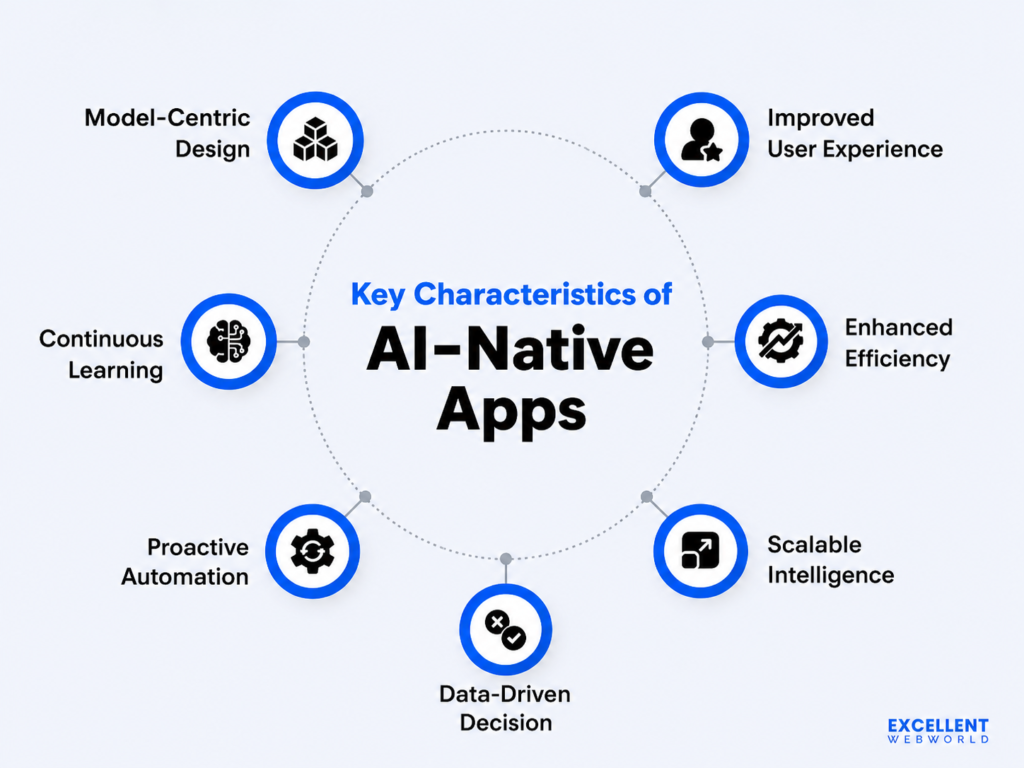
Key Characteristics of AI-Native Applications
1. AI Is the Core Architecture
In AI-native applications, AI is not simply a plugin or feature. The entire system is designed around intelligence.
Examples include:
- AI assistants
- Autonomous workflow systems
- Intelligent customer platforms
- AI-powered business applications
2. Adaptive Learning Capabilities
AI-native software can learn from:
- User interactions
- Business data
- Customer behavior
- Previous decisions
This allows applications to improve performance over time.
3. Natural User Interaction
AI-native applications enable users to interact through:
- Voice commands
- Natural language conversations
- AI chat interfaces
- Smart recommendations
Users no longer need to navigate complex menus or follow rigid processes.
4. Autonomous Decision-Making
Many AI-native systems can perform tasks independently, including:
- Data analysis
- Report generation
- Workflow automation
- Problem detection
- Recommendations
5. Real-Time Intelligence
AI-native applications process information instantly to provide:
- Faster insights
- Personalized experiences
- Automated responses
- Predictive recommendations
How AI-Native Applications Work
1. Data Collection
AI-native applications collect data from multiple sources, such as:
- User activity
- Business systems
- Sensors
- Databases
- External platforms
2. AI Model Processing
Advanced AI models analyze data using:
- Machine learning algorithms
- Neural networks
- Natural language processing
- Computer vision
3. Intelligent Response Generation
The application uses AI insights to:
- Answer questions
- Complete tasks
- Generate content
- Recommend actions
4. Continuous Improvement
AI systems improve through:
- Feedback loops
- New data
- Model updates
- User interactions
Examples of AI-Native Applications
AI Customer Support Platforms
AI-native customer service applications can:
- Understand customer questions
- Provide instant responses
- Predict customer needs
- Escalate complex issues
AI Coding Assistants
AI-powered development tools help programmers:
- Write code
- Detect errors
- Generate documentation
- Improve software quality
AI Healthcare Applications
Healthcare AI applications support:
- Medical image analysis
- Patient monitoring
- Drug research
- Clinical decision support
AI Business Applications
Companies use AI-native software for:
- Financial forecasting
- Sales automation
- Marketing optimization
- Data analytics
AI Personal Assistants
AI assistants help users manage:
- Scheduling
- Research
- Communication
- Daily tasks
Benefits of AI-Native Applications
Increased Efficiency
AI-native applications automate repetitive tasks and allow teams to focus on higher-value activities.
Better User Experiences
These applications provide:
- Personalized recommendations
- Faster responses
- More intuitive interactions
Improved Decision-Making
AI analyzes large amounts of data to deliver valuable insights and predictions.
Faster Innovation
Businesses can develop new products and services more quickly using AI-driven systems.
Cost Reduction
Automation helps organizations reduce operational costs and improve productivity.
AI-Native Applications vs Traditional Applications
| Feature | AI-Native Applications | Traditional Applications |
| Core Technology | AI-driven architecture | Rule-based systems |
| Learning Ability | Continuous improvement | Limited updates |
| User Interaction | Natural language and intelligent interfaces | Manual navigation |
| Decision Making | Automated and predictive | Human-driven |
| Personalization | Highly customized | Limited |
| Scalability | AI-powered automation | Manual expansion |
Industries Adopting AI-Native Applications
Finance
AI-native financial applications help with:
- Fraud detection
- Risk analysis
- Investment insights
- Automated banking services
Retail and E-commerce
Businesses use AI-native solutions for:
- Product recommendations
- Customer personalization
- Inventory management
- Shopping assistants
Education
AI-native learning platforms provide:
- Personalized lessons
- AI tutoring
- Automated assessments
Manufacturing
AI applications support:
- Predictive maintenance
- Quality control
- Smart automation
Marketing
AI-native marketing tools help companies with:
- Content generation
- Customer segmentation
- Campaign optimization
Challenges of AI-Native Applications
Data Privacy and Security
AI systems require large amounts of data, creating concerns about:
- Data protection
- User privacy
- Security risks
Development Complexity
Building AI-native applications requires expertise in:
- AI engineering
- Data science
- Cloud infrastructure
- Machine learning operations
AI Accuracy Issues
AI models may sometimes produce:
- Incorrect information
- Biased results
- Unexpected outputs
Human oversight remains important.
Infrastructure Costs
Advanced AI applications may require significant investment in:
- Computing resources
- Cloud services
- AI models
How Businesses Can Build AI-Native Applications
Step 1: Identify AI Opportunities
Businesses should determine areas where AI can create value, such as:
- Automation
- Customer experience
- Analytics
- Decision-making
Step 2: Develop an AI Strategy
Organizations need:
- Clear goals
- Data strategies
- Technology planning
- AI governance policies
Step 3: Build AI Infrastructure
Companies should invest in:
- Cloud platforms
- AI models
- Data pipelines
- Security systems
Step 4: Continuously Improve AI Systems
AI-native applications require ongoing:
- Training
- Testing
- Monitoring
- Optimization
The Future of AI-Native Applications
The future of AI-native applications will be shaped by:
- Autonomous AI agents
- Multimodal AI systems
- Personalized digital experiences
- AI-powered automation
- Self-improving software
Future applications will move beyond responding to users and become proactive systems that anticipate needs, solve problems, and complete complex tasks automatically.
Conclusion
AI-native applications represent the next generation of intelligent software development. By placing artificial intelligence at the center of application design, businesses can create systems that are smarter, faster, and more adaptive.
As AI technology continues to evolve in 2026, AI-native applications will transform industries by improving automation, personalization, decision-making, and digital experiences. Organizations that embrace this approach will be better positioned to compete in the future of intelligent software.



Post Comment